Chatib asks for five fields before you can type, and here is each one
Chatib is a free browser chat site at chatib.us that runs public chat rooms alongside private one to one messages, with nothing to download and no account required. Before a guest is allowed to speak, the chatib front page asks for a username, a gender, an age, a country and a state, then unlocks a button labelled Start Chat Now. That form is what this page is about.
So why does chatib, whose own page title promises online chat with no registration, still put a five field form between a visitor and a stranger? Because registration and onboarding are two different things. Not registering means no email address, no password and nothing filed under your name afterwards. It does not mean nothing is asked at the door. We counted seven separate gates on the chatib front page between arriving and sending a first message, and exactly one of the seven is a nickname.
A nickname is the only field here. No email, no password, no app, no camera, and you are matched with a single person. Restricted to adults.
What Chatib is, and what it asks for first
The chatib front page describes itself as free chat rooms where you can meet new friends from all over the world, with no download, no setup and no registration needed. Chatib's own wording adds that you can talk with single women and men and with random strangers from the United States, Canada, the United Kingdom and Australia, in several chat rooms at once, and that a private conversation can be opened at any time. Chatib names web and mobile browsers on phones, tablets and desktops as the way in, so nothing is installed.
All of that is accurate and none of it is the friction people actually meet. The friction sits in a panel headed Chat Without Registration, which is the chatib guest entrance, and in the small pile of prompts wrapped around it. We read that page in full on 6 September 2026 rather than trusting the summary, and the count below comes from the markup of the form itself, not from a description of it. Five fields, one consent banner, one automated check, and a submit control that arrives switched off.
Every gate between landing and a first message
This is the comparison worth having, because feature grids miss it entirely. What matters when you are three seconds into a site is how many things stand between you and typing a sentence. Each row below is one of those things.
| Gate | On Chatib | Here |
|---|---|---|
| Consent banner | Cookie and data notice with Accept and Deny | None shown |
| Username | Required text field, labelled Choose your username | A nickname box, and that is the whole form |
| Gender | Two radio buttons, Female preselected | Not asked |
| Age | Required dropdown running 18 to 69 | Not asked. The door is over 18s only |
| Country | Required dropdown, more than 200 entries | Not asked |
| State | Second dropdown, filled from your country | Not asked |
| Bot check | Automated check wired to the submit button | None to clear |
| Submit | Start Chat Now, served disabled | Start chatting, live on arrival |
| Account | Optional. Login and Register sit under the form | No account exists to make |
| Idle timeout | A one minute countdown offers to keep you signed in | No session to keep alive |
| Download | None. The site states no download and no setup | None |
Gates read from the chatib.us front page on 6 September 2026, field labels included. Seven of the eleven rows stand before a first message; the last four describe what happens around it.
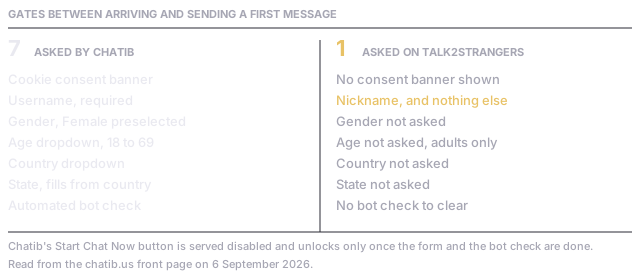
The Chatib guest form, field by field
Taken one at a time the chatib fields are mild, and that is precisely why the total is easy to miss. The username is a required text box under the words Choose your username. Gender is a pair of radio buttons offering Female and Male, with Female already selected for you, which is a default rather than a question. Age is a required dropdown whose options begin at 18 and stop at 69, sitting under a label that says the site is limited to over 18s. Country is a required dropdown carrying more than two hundred entries.
The fifth is a state field that repopulates when you change the country above it, so the two are wired together and the second cannot be answered before the first. None of these five is difficult. Together they are the chatib form, and a form is a decision point: on a phone, five taps into a keyboard and three scrolling pickers before a single word of conversation. Our own entrance asks for a nickname because a name is what the other person needs to reply to. Anything past that would be collection, not conversation.
The gates that are not fields
Three of the seven gates never appear in the form at all. First, a cookie and data collection notice with Accept and Deny buttons, plus a line offering to stop your data being shared with third parties. Second, an automated bot check bound to the submit control, which is why the Start Chat Now button is delivered in a disabled state and only becomes clickable once the check and the form are both satisfied. Third, a session timer: an inactivity prompt counts down from one minute and asks whether you want to stay signed in.
A disabled submit button is the honest summary of chatib onboarding. The site is genuinely free and genuinely account free, and the button still cannot be pressed on arrival.
We are not calling any of this bad practice. A consent banner is a legal requirement in much of the world, a bot check keeps automated spam out of public rooms, and an idle timer frees a seat somebody else can use. Every one of them exists for a reason. The point is only that seven reasons add up to seven chatib gates, and the person arriving from a search does not experience them as seven separate policies. They experience one delay.
What no registration covers on Chatib, and what it does not
The phrase is doing a lot of work, and it is worth splitting. On chatib, no registration is a true claim about accounts: the guest route needs no email, no password and no confirmation link, and a review guide in the same search results says the same thing, that a nickname is enough to enter and registration is offered only if you want continuity. That is a real difference from a dating site, and it is the reason the word appears in the chatib page title.
What the phrase does not cover is the guest form. Age, gender, country and state are collected whether or not an account is ever created, and they are collected before the conversation, not during it. There is a second thing it does not cover, which is what shows up next to you: the same front page carries cautions about sending images, which tells you image sending exists in the product. Our pages on what anonymous actually covers apply the same test to any name in this category.
What Chatib offers that one door does not
The fair half. Those fields buy the person something, and pretending otherwise would be a poor comparison. Country and state feed a location signal, so chatib can put people who are nearby in front of each other, which the chatib front page describes as meeting people living in your area. Gender feeds a preference, and age gives rooms a rough shape. Chatib also runs many rooms at once and lets one person sit in several, which a single pair by definition cannot do.
None of that exists here, and none of it is planned. There is no location matching, no gender preference and no age filter, because we ask for none of the three inputs those features would need. If you came to chatib specifically to find somebody in your own city, one random pair is a worse tool for that job and it would be dishonest to claim otherwise. What we offer instead is the shorter walk in and no audience once you are through.
Why a search for chat ib lands on odd results
People type chat ib as two words about as readily as one, and the results are the same set either way. The shape of that set is worth knowing before you click. Chatib itself sits first. Below it, on the day we looked, sat a Google Play listing titled Chatib: Connect Stranger Help whose application identifier belongs to a wallpaper and desk scenery package, so the listing name and the software behind it do not match. An APK download page and a third party review guide also rank, alongside a chat site directory entry.
That matters for a simple reason. A person searching chat ib on a phone can quite easily install something that has nothing to do with chatib at all, because the store listing carries the name. Nothing on the real chatib site needs installing, by its own statement, so treat any app store result for this term with suspicion and go to the website. Our note on the TalkWithStranger directory covers another of the pages that rank here.
Three steps to a first message here
The whole walk, for comparison with the table above.
- Type a nickname. Nothing else is asked: no gender, no age, no country, no state.
- Choose text or voice. Voice is a live call with no camera at any point, decided before you connect.
- Press start. You are paired with one stranger and can type immediately, or press next for another.
Questions about getting into Chatib
- Does Chatib require registration?
- Not for the chatib guest route. The chatib front page states no download, no setup and no registration needed, and the guest panel is headed Chat Without Registration. Login and Register links sit beneath that panel as options, so an account is available to anybody who wants one but is not required to enter.
- What does the Chatib guest form actually ask for?
- Five things on the chatib form, in this order: a username, a gender chosen from Female and Male with Female preselected, an age from a dropdown running 18 to 69, a country from a list of more than two hundred, and a state that fills in based on the country you picked. All five come before your first message.
- Why is the Start Chat Now button greyed out?
- Because it is served that way. The submit control on the chatib guest form arrives in a disabled state and is wired to an automated bot check as well as to the fields, so it only becomes clickable once both are satisfied. Completing the form is what switches it on.
- Is there a Chatib app worth installing?
- Chatib states no download and no setup, and describes itself as working in a phone, tablet or desktop browser. App store results for this name exist and at least one of them is mislabelled, carrying the name over software that does something else entirely, so the website is the safer route.
- Does the chatib form need your location?
- On the chatib guest form, yes: country is required and a state field follows it. Here, no. We ask for a nickname and nothing else, which also means we cannot offer you anybody nearby, because we never learn where either of you is.
Age, voice, cost and what is kept
- Can somebody under 18 use this site?
- No. Entry here is for over 18s and there is no room or section for anybody younger. Chatib puts a similar floor on its own age dropdown, whose lowest option is 18 under a label saying the site is limited to over 18s. Our rules page sets out what else is not allowed.
- Is talk2strangers connected to Chatib?
- No. This site is run independently and has no relationship with chatib.us or with any other name mentioned on this page. We set them side by side so the entry requirements are visible before you commit to either.
Voice, cost and what is kept afterwards
- Can you talk out loud instead of typing?
- Yes, and it needs no install either. Pick audio at the start and you are placed in a spoken exchange with a single person, camera-free throughout. Pacing and emphasis reach the other side intact, and those are precisely the signals a typed message drops. The voice chat page explains the pairing.
- Does either site cost money?
- Chatib describes its chat rooms as free and we found no purchase step on its front page. This site is free as well, with no paid tier, no credits and nothing to unlock. Worth confirming on any chat site you compare, because free often describes the entrance rather than the whole building.
Photos, and what survives the tab closing
- Can photos be sent?
- The chatib front page carries warnings about sharing personal photos and says images may be sent if they are appropriate and carry no text, which tells you the feature is there. Here there is no image sending, no file transfer and no camera, so nothing visual can arrive from a stranger at all.
- What is kept after the tab closes?
- Nothing you can reopen. No log is kept for you, no page exists for anyone to look you up on afterwards, and the messages themselves are cleared rather than stored. The privacy notice states the exact retention period.
If you are still comparing names, we also looked at the cost card we apply to any free chat site and at why an installed chat app behaves differently to a tab.
The sign-up question comes up elsewhere too: a chat site that asks for no account and keeps no ban list, and one that never puts a sign-in in front of you.
Two more brands that ask for more than a nickname: what CallMeChat's translation feature does and doesn't solve, and what "secure" actually covers on FTF Live.
Last verified: 2026-09-06
Pages consulted for this write-up: the Chatib front page for the guest form, its field labels and the no registration claim, a third party review guide for how the nickname entry is described elsewhere, and a chat site directory entry for how the wider category lists it.