Free calling: what free really costs, in 7 different kinds
What does free calling actually cost? Rarely money at the moment you dial, but something does change hands: mobile data, a plan you already pay for, a stream of ads, points earned by small tasks, or your personal details. The seven kinds compared below differ mostly in which of those you pay with, and one of them needs no phone number at all.
Short on time? Enter a nickname above, choose voice, and you are paired with one adult stranger. No number, no app, no download.
Most pages for this search are dialers that ring a number for you. This guide starts earlier, with the question they skip: who pays for the minutes? We read two browser dialers' on-screen messages ourselves, and opened every standards and government page listed below before quoting it.
Seven kinds of free calling, side by side
Every free online call you will meet fits one of these rows. Read across before down, because the word free covers rows that cost nothing extra and rows that cost your phone number.
| Kind | Suits | What free really means | The catch | What you need |
|---|---|---|---|---|
| 1. Messaging-app call | Friends on the same app | No per-minute charge between two accounts | Uses data; both sides need the app and an account | The app, Wi-Fi or mobile data |
| 2. Operator Wi-Fi calling | A weak signal at home | Your normal number, covered by your existing plan | Needs a compatible phone and operator support | Compatible handset, your SIM, Wi-Fi |
| 3. Browser dialer to phone numbers | A short call to a mobile or landline | Paid in starter credit, earned points or ads | Verification, caps, time limits, no guaranteed callback | Current browser, microphone, number with country code |
| 4. Trial-credit call | Testing a service once | A starter balance that runs out | Sign-up, sometimes a card, then renewal | An account, email or phone number |
| 5. Conference dial-in | A meeting you were invited to | Joining by internet costs nothing | Reaches only that meeting | Browser, headphones, the access code |
| 6. Link-based voice room | A small group of friends | No charge to join with the link | Anyone holding the link and password can enter | Browser, the invite link |
| 7. Voice call with a random stranger | Talking to someone new | No charge, no phone number | You cannot choose who you get | Browser, microphone permission |
Cells describe how each kind generally works; individual services differ.
What free is actually paid with
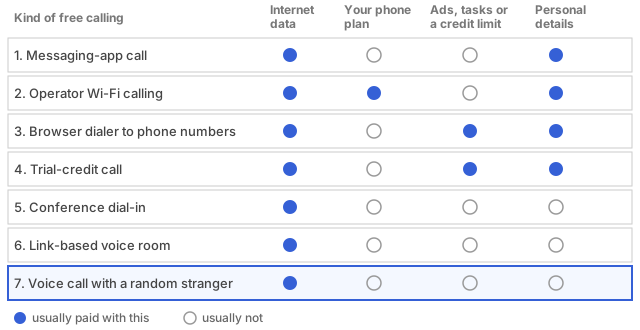
Think of a free call online as a trade in five currencies. Data comes first: an internet call travels over a connection, so it draws on your broadband allowance or mobile pack even when no per-minute charge appears. Your existing plan is second; one large Indian operator's own Wi-Fi calling page says the service comes at no additional charges and needs a compatible handset plus that operator's 4G SIM. Effort is third: the browser dialers we read let you earn points through simple tasks or a daily check-in, warn of Not enough points when the balance empties, and on one plan stop at 15 contacts.
Attention (ads) is fourth and identity fifth: dialers ask you to verify a number, an email or carrier details first, and a second dialer's page says it stores your IP address and the number dialled to trace prank callers. Rules matter too. On 19 June 2018 India's Department of Telecommunications amended licence terms so licensed operators could offer internet telephony over someone else's internet access, home Wi-Fi included, per a law firm's summary dated 27 June 2018. Calls that end at an ordinary number still cross licensed networks, a fair reason to expect identity checks and caps whenever a web dialer rings one.
How much data does an internet call use?
Less than most people expect, and it depends on the quality setting. RFC 6716, the open standard behind the voice format most browsers use for calls, describes rates from 6 kbit/s for narrow speech to 510 kbit/s for high-quality stereo music: 45 kilobytes a minute at the bottom, about 3.8 megabytes at the top. Take 32 kbit/s purely as a worked example, chosen for the sum and not measured on any service: a minute uses 240 kilobytes and an hour about 14 megabytes. Video multiplies the total, and free calling over an operator's Wi-Fi spends broadband data, leaving your mobile pack alone.
Why free calling apps show ads, and what to do about it
Delivering a call to an ordinary phone number means paying whichever network finishes it, so a free calling app is being paid by somebody else: advertisers, partner offers, upgrade plans or the data it collects. Ads are the visible cost; permissions are the hidden one, since a dialer usually has no reason to read your contacts, texts or call history. Check whether the free tier has a time limit, whether a trial renews into a paid plan, and whether earned minutes expire. When a browser tab does the same job, skipping the install removes the permissions question altogether.
Scams, privacy and unknown callers in free calling
A free online call from an unknown number is no safer than any other, and cheap calling is cheap for scammers too. The warning signs repeat: a caller posing as police, a courier, a bank or a telecom regulator; pressure to act within minutes; a request for a one-time password; a push to install screen-sharing software. A real organisation will accept you hanging up and calling back on a number from its own site or card. In India, the Sanchar Saathi portal runs Chakshu to report suspected fraud calls; its page says Chakshu is not for money already lost, which goes to the cyber-crime helpline 1930 and cybercrime.gov.in.
For privacy, share less than a call seems to ask for: a nickname is enough, a city is too much, and a phone number belongs only to people you trust. Our note on what anonymous chat covers and what it hides separates hiding your name from hiding your connection, the habits in talking to someone new suit any first call, and the crisis help page lists people to reach if a call leaves you shaken.
Microphone, headphones and call quality for free calling, including accessibility
Browsers offer the microphone only to pages on a secure connection and always ask first, so expect one permission prompt per call page. Wear headphones, even cheap wired ones: speakers feed the other person back into your microphone, the usual cause of echo, and one conference dial-in page gives the same advice. Delay, not volume, is the other culprit. ITU-T G.114 says one-way delay under 150 ms leaves most applications with essentially transparent interaction, and that 400 ms should not be exceeded in network planning; a congested Wi-Fi network or a weak signal can push a call past both.
Calls can be captioned too. Google's Android accessibility help says Live Caption captions phone calls and video calls, processes audio on the device, and is not intended for calls with more than one other person; Chrome has a similar setting for browser audio. Support varies by app, so test first, and keep text as the fallback.
Where a free online call with a stranger fits
Of the seven kinds, the last is the odd one out: nobody dials anybody. Two adults who have never met are paired and talk, so there is no number to hand over and nothing to call back. Our free online call costs nothing, runs in the browser tab and asks for a nickname and a microphone permission, with no app, no download and no video. You are paired with one person at a time, Next moves you on, and matching ignores where you are: there is no distance setting and no location request.
For friends, a private room holds up to 5 people in text or voice. You name it with at least 3 letters or numbers, lock it with a password of 8 or more characters, confirm you are 18 or over and share the invite link. The limits are real: you cannot choose who you get, you cannot ring a mobile or landline, and a stranger is still a stranger. The random voice chat page shows what a call feels like, and the browser-versus-app explanation covers what installing nothing skips.
Nobody under eighteen should be using any of this, and the conduct expected from the adults who are is written out in the acceptable use rules.
Questions about free calling
Cost and data
- Is any calling genuinely free?
- At the moment of the call, some of it is. Two accounts on one messaging app, or two people in a browser, pay no per-minute fee. It still uses data and rests on a phone and connection you pay for, so free means no extra charge, not no cost.
- Can I make a free online call to a mobile or landline number?
- Sometimes, in small amounts. Browser dialers that ring ordinary numbers fund the minutes with starter credit, earned points or ads, and add caps and verification. Type the number with its country code first, and do not assume the person can ring you back.
- Does a free call online use my mobile data?
- Yes, unless you are on Wi-Fi. At the 32 kbit/s used in the worked example above, an hour of voice is about 14 megabytes, while video can use far more. Wi-Fi calling over home broadband spends broadband data instead.
Quality and setup
- Why does my free online call lag or sound robotic?
- Usually the connection adds delay or drops pieces of audio, not your handset. Guidance from the ITU treats one-way delay under 150 ms as essentially transparent, and a busy Wi-Fi network can exceed it. Move closer to the router and try wired headphones.
- Do I need to install anything?
- Not always. Messaging-app calls need the app on both sides and Wi-Fi calling needs a compatible phone and SIM, but browser dialers, meeting dial-ins and stranger voice calls run in an up-to-date browser with a microphone permission.
- Is Wi-Fi calling the same as calling through a messaging app?
- No. Wi-Fi calling is your operator's feature: the call goes out on your normal number to any phone, at no additional charges according to the operator page we read. A messaging-app call only connects people who both have that app.
Safety, access and strangers
- How can I tell whether a free calling app is safe?
- Look at what it asks for before what it offers. Access to contacts, texts or the call log is a warning sign for a dialer, and so is a trial that hides its renewal terms. Read recent reviews, not the star average.
- Can free calls be captioned if someone is hard of hearing?
- Often. Google says Live Caption on supported Android phones captions phone calls and video calls with audio processed on the device, for calls with one other person. Chrome has a comparable setting for browser audio; support varies by app.
- Can I call a stranger for free without sharing my number?
- Yes, through a service that pairs two adults in a browser tab and identifies them only by a nickname. No number is involved, so none can leak. You still decide what to say, so keep your name, city and finances out of it.
How to place a free call online and fix a poor one
Four moves cover free calling to a friend or to a new voice, in this order.
- Pick the kind of free calling that fits who you are calling: a shared app for friends, a link-based room for a small group, a browser alone for a stranger. For an ordinary number, plan on credit or a plan that includes calls.
- Set up the sound before dialling: plug in headphones, close apps that may hold the microphone, allow access when the browser asks, and check the volume.
- Place the call and test the line at once. Say hello and ask whether you sound clear; if you hear an echo, turn the speaker down or switch to headphones.
- If quality drops, change one thing at a time: move closer to the router, pause downloads, close extra tabs, then swap mobile data for Wi-Fi or the reverse. If nothing helps, fall back to text, which survives a weak connection better than voice.
Where the numbers live: RFC 6716, the voice format standard for the 6 and 510 kbit/s range, ITU-T G.114 on one-way delay for the 150 ms and 400 ms figures, and India's Sanchar Saathi portal for Chakshu and the 1930 helpline.